anvi-profile-blitz
Table of Contents
FAST profiling of BAM files to get gene-, contig-, or genome-level coverage and detection stats. Unlike anvi-profile, which is another anvi'o program that can profile BAM files, this program is designed to be very quick and only report long-format files for various read recruitment statistics per item. Plase also see the program anvi-script-get-coverage-from-bam for recovery of data from BAM files without an anvi'o contigs database.
🔙 To the main page of anvi’o programs and artifacts.
Authors

Requires


Can use
collection-txt  genes-of-interest-txt
Provides
Usage
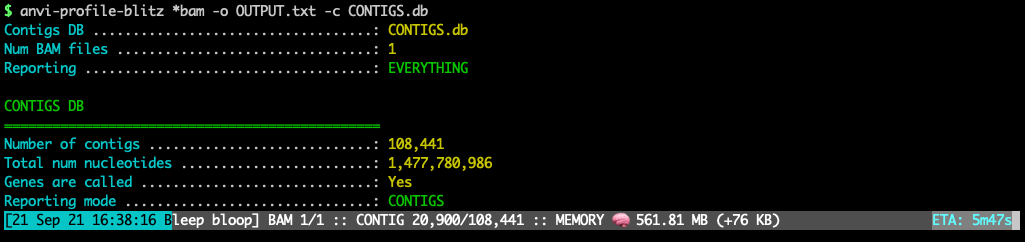
This program produces a bam-stats-txt from one or more bam-file given a contigs-db. It is designed to serve people who only need to process read recruitment data stored in a bam-file to recover coverage and detection statistics as well as the number of mapped reads (along with other statistics) for their genes, contigs, and/or genomes. It will report what’s going on nicely with memory usage information and estimated time of completion:
There are other programs in anvi’o software ecosystem that are similar to this one:
-
anvi-profile also takes a bam-file and profiles it. They both require a contigs-db. But while anvi-profile produces a single-profile-db for downstream analyses in anvi’o, anvi-profile-blitz produces text files for downstream analyses by the user (via R, Python, or other solutions). In contrast to anvi-profile, anvi-profile-blitz is orders of magnitude faster with similar memory usage.
-
anvi-script-get-coverage-from-bam also takes a bam-file and profiles it. They both produce text output files. But while anvi-script-get-coverage-from-bam does not require a contigs-db, anvi-profile-blitz requires one to work. They will both run very rapidly, anvi-script-get-coverage-from-bam will work with a much smaller amount of memory.
Output files
For output file formats, please see bam-stats-txt.
Running
You can use this program with one or more BAM files to recover minimal or extended statistics for contigs or genes in a contigs-db.
Since the program will not be able to ensure the contigs-db was generated from the same contigs-fasta that was used for read recruitment that resulted in bam-files for analysis, you can make serious mistakes if you mix up your workflow and start profiling BAM files that have nothing to do with a contigs-db. If you make a mistake like that, in the best case scenario you will get an empty output file because the program will skip all contigs with non-matching name. In the worst case scenario you will get a file if some names in contigs-db incorrectly matches to some names in the bam-file. While this warning may be confusing, you can avoid all these if you use the SAME FASTA FILE both as reference for read recruitment and as input for anvi-gen-contigs-database.
Contigs mode, default output
Profile contigs, produce a default output:
anvi-profile-blitz bam-file \ -c contigs-db \ -o OUTPUT.txt
This example is with a single BAM file, but you can also have multiple BAM files as a parameter by using wildcards,
anvi-profile-blitz *.bam \ -c contigs-db \ -o OUTPUT.txt
or by providing multiple paths:
anvi-profile-blitz /path/to/SAMPLE-01.bam \ /path/to/SAMPLE-02.bam \ /another/path/to/SAMPLE-03.bam -c contigs-db \ -o OUTPUT.txt
Contigs mode, minimal output
Profile contigs, produce a minimal output. This is the fastest option:
anvi-profile-blitz bam-file \ -c contigs-db \ --report-minimal \ -o OUTPUT.txt
Genome/bin mode via collections
If you have a collection-txt, you can summarize coverage/detection statistics per bin/genome instead of per contig.
anvi-profile-blitz bam-file \ -c contigs-db \ -C collection-txt \ -o OUTPUT.txt
Bin-level detection and coverage are computed by treating all contigs in a bin as a single genome (nucleotide arrays are concatenated under the hood). With --report-minimal, these statistics are streamed to keep memory usage close to contig mode even for large bins.
Genes mode, default output
Instead of contigs, profile genes, produce a default output:
anvi-profile-blitz bam-file \ -c contigs-db \ --gene-mode \ -o OUTPUT.txt
--report-minimal will behave the same, and produce minimal output.
Genes mode, on a subset of genes
You don’t want to profile all genes in your contigs-db? Then you should tell anvi’o which specific genes you are interested in by either providing a comma-separated list of gene-caller IDs:
anvi-profile-blitz bam-file \ -c contigs-db \ --gene-mode \ -o OUTPUT.txt \ --gene-caller-ids 5,13,74,203
Or by providing a genes-of-interest-txt file:
anvi-profile-blitz bam-file \ -c contigs-db \ --gene-mode \ -o OUTPUT.txt \ --genes-of-interest genes-of-interest-txt
Modifying DisCov parameters
For genomes or contigs, anvi-profile-blitz can compute the Distribution of Coverage (DisCov) score alongside other coverage statistics. DisCov combines a spread score S (proportion of windows with coverage) and an evenness score E (proportion of covered bases within a fold-range of the median nonzero coverage). See discov-stats for a full description of the metric and parameters.
The default parameters are designed to work well across typical metagenomics data, but you can adjust them:
Window sizing for S
The spread score (S) is computed by dividing the input sequence into non-overlapping windows. By default, contig-level stats use a window length equal to 1% of the contig length (minimum 300 bp). Genome/bin-level stats (when using --collection-txt) use a fixed 1,000 bp window. You can override these defaults with the following parameters:
--window-length INT— use a fixed window size in bp for all sequences--window-length-as-percentage FLOAT— set window length as a percentage of each sequence’s length--min-window-length INT— set a minimum window length floor when using percentage mode
Fold-range for E
The evenness score (E) counts bases with coverage between a lower and upper fold-multiple of the median nonzero coverage. The default fold-range endpoints are 0.5x and 2.0x. To adjust:
--foldrange-lower FLOAT— lower bound (default: 0.5)--foldrange-upper FLOAT— upper bound (default: 2.0)
Combining S and E
You can adjust how S and E are combined by changing either their weights or the overall DisCov formula:
--alpha FLOAT— weight of S relative to E, in [0, 1] (default: 0.5)--discov-formula STRING—linear(DisCov = αS + (1-α)E) orgeometric(DisCov = S^α × E^(1-α)) (default:linear)
Window-level output
To inspect the per-window values used to compute S (useful for debugging or visualization), add the --gen-window-level-output flag:
anvi-profile-blitz bam-file \ -c contigs-db \ -o OUTPUT.txt \ --gen-window-level-output
This produces an additional file named OUTPUT-WINDOWS.txt with per-window start/stop positions, coverage presence, and base counts within the fold-range.
Note that computing DisCov is not compatible with --gene-mode or --report-minimal.
Performance
The memory use will be correlated linaerly with the size of the contigs-db, but once everything is loaded, the memory usage will not increase substantially over time.
With the flag --report-minimal, anvi-profile-blitz profiled on a laptop computer 100,000 contigs that contained 1 billion nts in 6 minutes and used ~300 Mb memory. This contigs database had 1.5 million genes, and memory usage increased to 1.7 Gb when anvi-profile-blitz run in --gene-mode. The flag --gene-mode does not change time complexity dramatically.
Anvi’o has this program because Emile Faure presented us with a challenge: Emile had a ~140 Gb anvi’o contigs-db that contained nearly 70 million contig sequences from over 200 single-assembled metagenomes, and wanted to learn the coverages of each gene in the contigs database in 200 metagenomes individually. Yet the combination of anvi-profile and anvi-summarize jobs would take more than 40 days to complete. Since all Emile needed was to learn the coverages from BAM files, we implemented anvi-profile-blitz to skip the profiling step. The run took 8 hours to compute and report coverage values for 175 million genes in 70 million contigs, and the memory use remained below 200 Gb.
Edit this file to update this information.
Command line interface
The following is the list of parameters and their descriptions in the latest version of anvi-profile-blitz.
The code that generates this web page ensures that this information is the latest available in 9-dev (eunice). Which means, in some cases the information in this section (generated automatically) might be more comprehensive or up-to-date compared to the descriptions above (written by humans).
Command line usage
Parameters and their descriptions
BAM_FILE(S)required- One or more indexed BAM files
-c, --contigs-dbCONTIGS_DBrequired- Anvi'o contigs database generated by 'anvi-gen-contigs-database'
--gene-mode- This program by default will summarize coverage and detection stats for contigs found in your contigs database. Declaring this flag will change that behavior and report coverage and detection stats for each gene. Brace yourself for a huge file for large contigs databases lol :(
--gene-callerGENE-CALLER- The gene caller to utilize. Anvi'o supports multiple gene callers, and some operations (including this one) may require an explicit mentioning of which one to use. The default gene caller is identified automatically in most cases (based on whether the most frequent gene calls match to a known gene caller in anvi'o), but if you have a contigs-db generated with `--external-gene-callers` or something, you may have to pay extra attention here. Also, some HMM collections may add new gene calls into a given contigs-db as an ad-hoc fashion, so if you want to see all the options available to you in a given contigs database, please run the program `anvi-db-info` and take a look at the output.
--gene-caller-idsGENE_CALLER_IDS- Gene caller ids to focus on. Multiple of them can be declared separated by a delimiter (the default is a comma, and if there is no option to change the delimiter, you must use a comma).In anvi-gen-variability-profile, if you declare nothing you will get all genes matching your other filtering criteria. In other programs, you may get everything, nothing, or an error. It really depends on the situation. Fortunately, mistakes are cheap, so it's worth a try.
--genes-of-interestFILE- A file with anvi'o gene caller IDs. There should be only one column in the file, and each line should correspond to a unique gene caller id (without a column header).
-C, --collection-txtCOLLECTION_TXT- Provide an anvi'o collection-txt artifact that associates each contig with a bin/genome. When a collection-txt is provided, anvi'o will report coverage and detection metrics per bin/genome rather than per contig.
-o, --output-fileFILE_PATHrequired- File path to store results.
--report-minimal- Using this flag, you can ask anvi'o to report minimum amount of data about your genes or contigs (such as mean coverage and detection) rather than a full blown output file with as much information as anvi'o can offer (such as, mean coverage, detection, Q2Q3 coverage, standard deviation of coverage, min/max values of coverage, GC-content and length of items, etc). Using this flag can cut your processing time in half. See the help docs for example output files for contigs and gene mode.
--gen-window-level-output- Generate an additional output file with per-window coverage statistics. For each window used to compute the DisCov metric, the output includes the window's start/stop positions in the sequence, its length, whether it has any coverage, and the number of bases within the fold-range of the median nonzero coverage. The file is named after the main output file with '-WINDOWS' inserted before the extension. Not compatible with --gene-mode or --report-minimal.
--window-lengthINTEGER- How long to make the windows for computing the spread metric: S = # windows with coverage / # windows. For genome/bin-level stats, this is the default when no window length parameters are provided, and the default window size is 1000.
--window-length-as-percentageINTEGER- With this option you can set the window length for the spread metric (S) dynamically as a percentage of a given input sequence length. This works well when your input sequences (contigs or genomes) have a wide size distribution and you don't have a one-size-fits-all window length to use. For instance, if you want the window size to be 5% of the contig length, you would use `--window-length-as-percentage 5`. You may want to consider also specifying a reasonable minimum window length with the --min-window-length parameter. This is the default window-sizing strategy for contig-level stats, and the default percentage is 1.
--min-window-lengthINTEGER- Use with --window-length-as-percentage to ensure that percentage-based window lengths never fall below this value. This parameter is set by default to 300 for contig-level stats.
--foldrange-lowerFLOAT- When computing evenness of coverage depth (E), count any bases with coverage OVER this value * the median nonzero coverage. In typical use-cases, this value will be the inverse of --foldrange-upper. The default is '0.5'. Default:
0.5 --foldrange-upperFLOAT- When computing evenness of coverage depth (E), count any bases with coverage UNDER this value * the median nonzero coverage. In typical use-cases, this value will be the inverse of --foldrange-lower. The default is '2.0'. Default:
2.0 --alphaFLOAT- How much to weight S over E in the DisCov score. Should be a value in the range [0,1]. The default is '0.5'. Default:
0.5 --discov-formulaSTRING- Which formula to use when combining S and E into the DisCov score. Options are 'linear' (DisCov = αS + (1-α)E) and 'geometric' (DisCov = S^α * E^(1-α)). The default is 'linear'. Default:
linear
Additional Resources
Are you aware of resources that may help users better understand the utility of this program? Please feel free to edit this file on GitHub. If you are not sure how to do that, find the __resources__ tag in this file to see an example.