anvi-display-codon-frequencies
Table of Contents
Display codon frequency statistics across genes in a given genome in the anvi'o interactive interface..
🔙 To the main page of anvi’o programs and artifacts.
Authors


Requires

Provides

Can provide

Usage
This program interactively displays gene-level codon frequency patterns across a set of contigs.
The program calculates gene-level frequencies of individual codons and displays them in a matrix format where each row represents a codon (ordered by the amino acids they encode), each column represents a single gene, and the data points represent the counts (or frequency, depending on user-provided parameters) of occurrence of a given codon in a given gene. By default, the program orders each gene based on their synteny (the conserved order of genes across genomes) to reveal patterns in codon usage throughout the genome.
This program is most effectively applied to a contigs-db that represents a single genome. Its utility for revealing synteny-based patterns of codon usage increases with decreasing numbers of contigs (i.e., a complete genome with a single contig will provide much better visualization than a metagenome-assembled genome (MAG) with 200 contigs, even though the program will visualize the latter adequately).
The calculation of different frequency statistics depends on a range of options, and the tool relies upon the same library that anvi-get-codon-frequencies uses.
Default output
The simplest form of this command is the following:
anvi-display-codon-frequencies -c contigs-db
When run this way, the program will generate a blank profile-db as a temporary file and will display the counts of each codon across each gene in the genome.
Here is an example with GCF_001458775.1, a reference genome for Nitrospira nitrificans:
anvi-display-codon-frequencies -c GCF_001458775.db
Which will display the following:
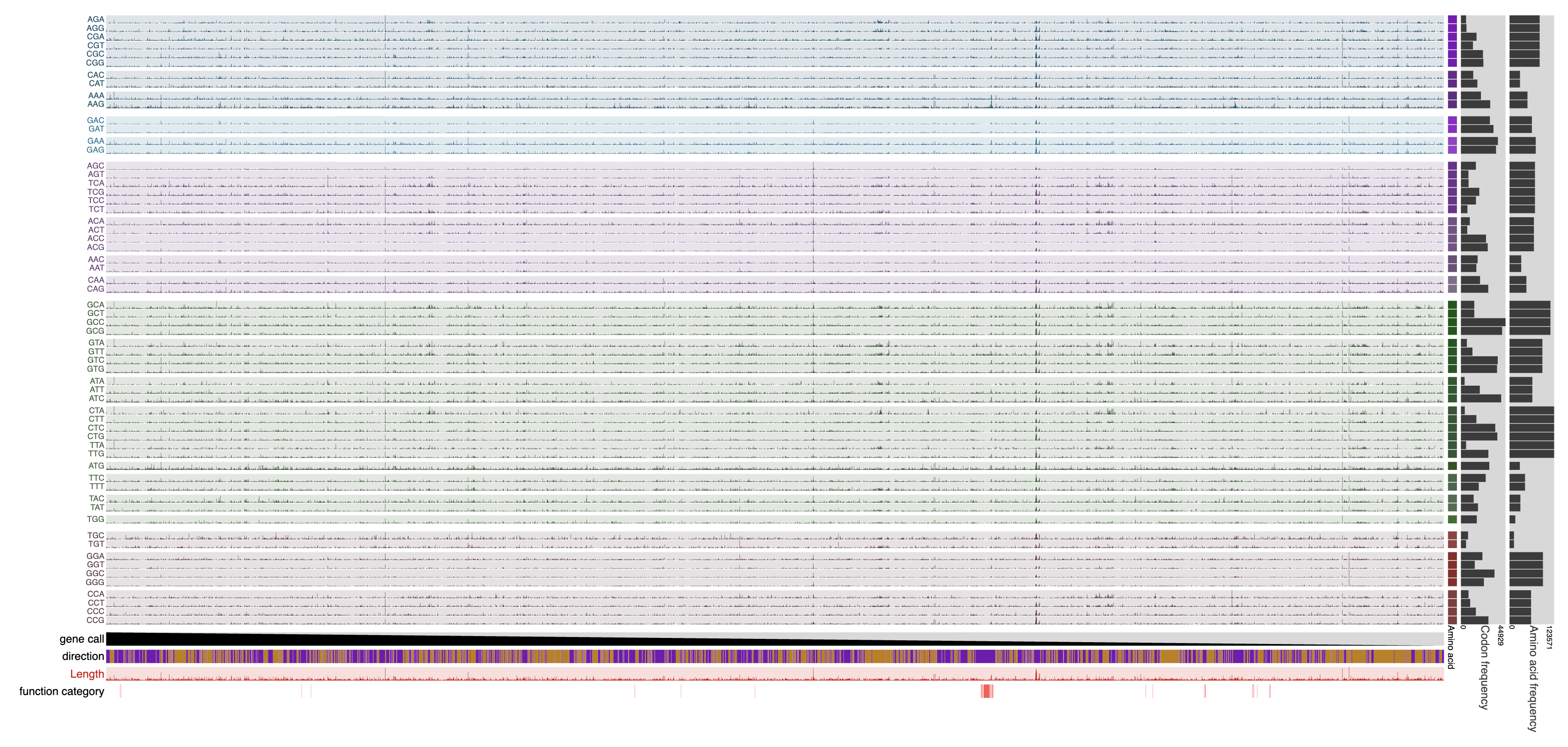
Here, every data point represents the actual count of a given codon in a given gene. As a result, very long genes that produce very large counts for each codon lead to the suppression of all other counts. It is possible to use any of the interactive interface capabilities to improve the visualization of data (such as setting up min/max values for layer data points, etc). It is also possible to run the program with additional parameters.
Additional parameters
Additional parameters available through the help menu of the program will help filter genes and functions, as well as determine how the data are normalized. For instance, the following command will exclude genes that are shorter than 100 nucleotides long, exclude the stop codon as well as those codons for amino acids methionine, tryptophan, and cysteine, normalize data within synonymous codons (codons that encode the same amino acid), and replace all empty values in output with 0.0:
anvi-display-codon-frequencies --gene-min-codons 100 \
                               --exclude-amino-acids STP Met Trp Cys \
                               --synonymous \
                               --infinity-to-zero \
                               -c GCF_001458775.db
Which will display the following:
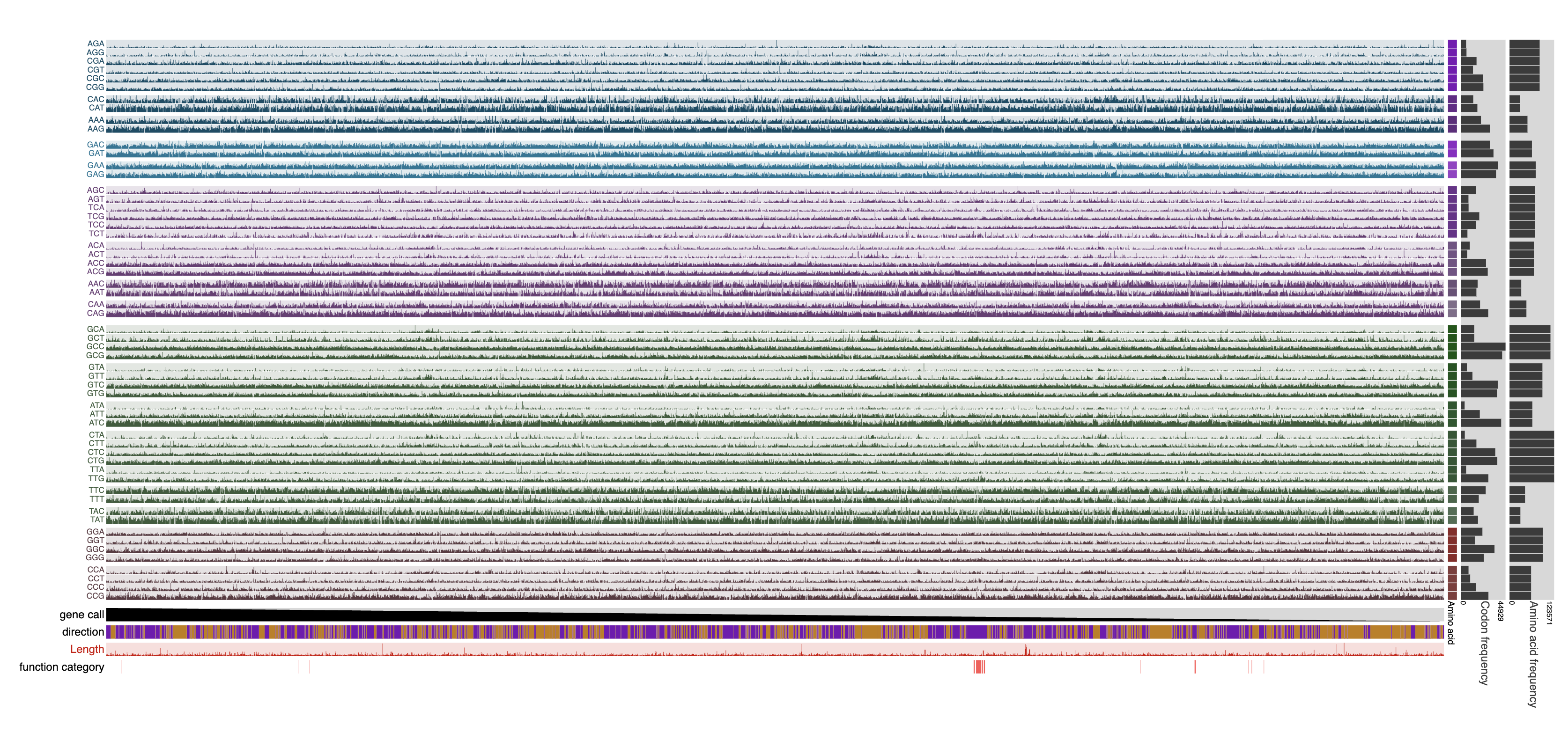
Please see the help menu for a complete list of parameters.
Visualization features
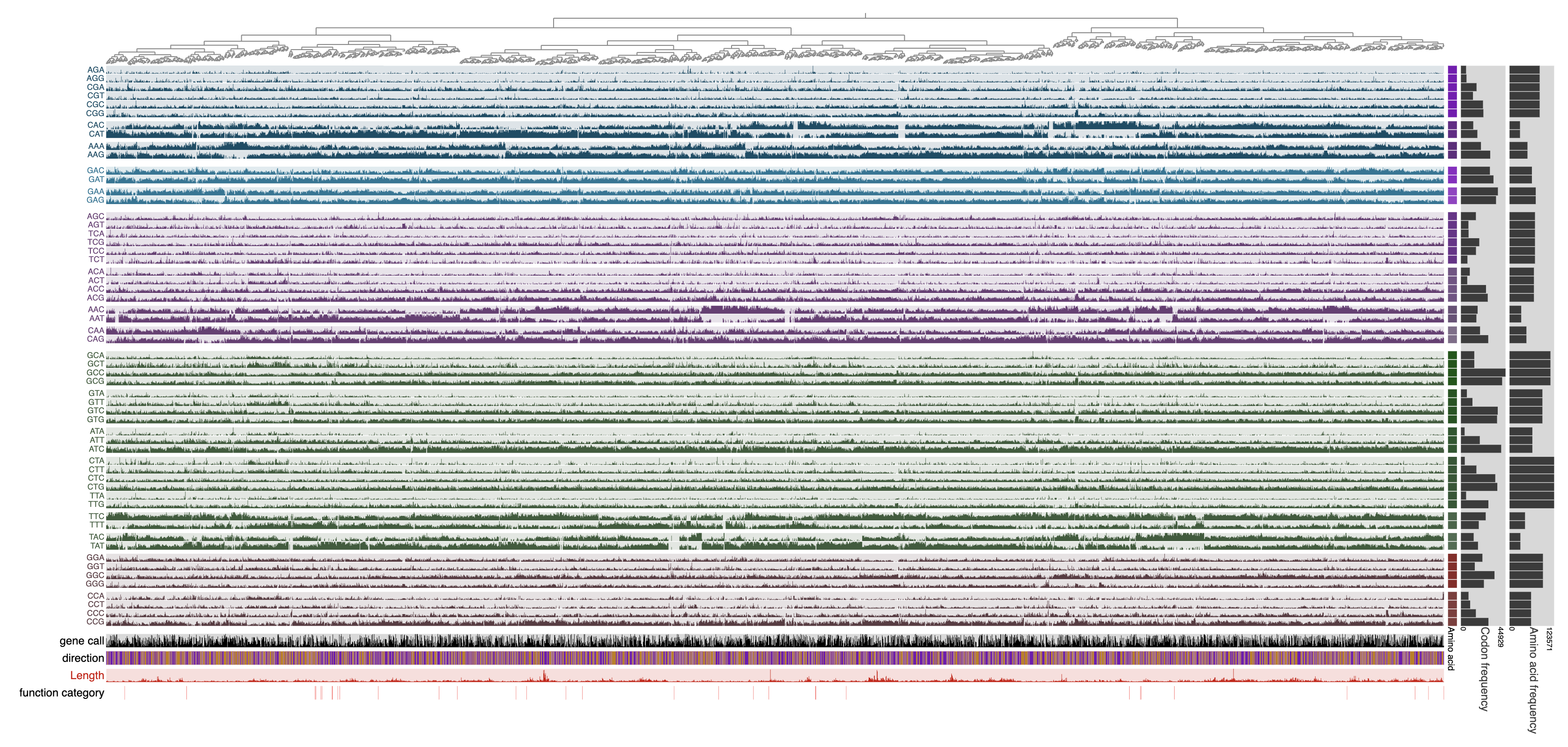
Once the display is shown, the genes can also be ordered based on hierarchical clustering of the codon frequencies using the Settings panel, and then selecting the ‘Codon frequencies’ option from the ‘Order’ menu and clicking Draw to bring together those genes that show similar codon usage patterns regardless of their location in the genome:
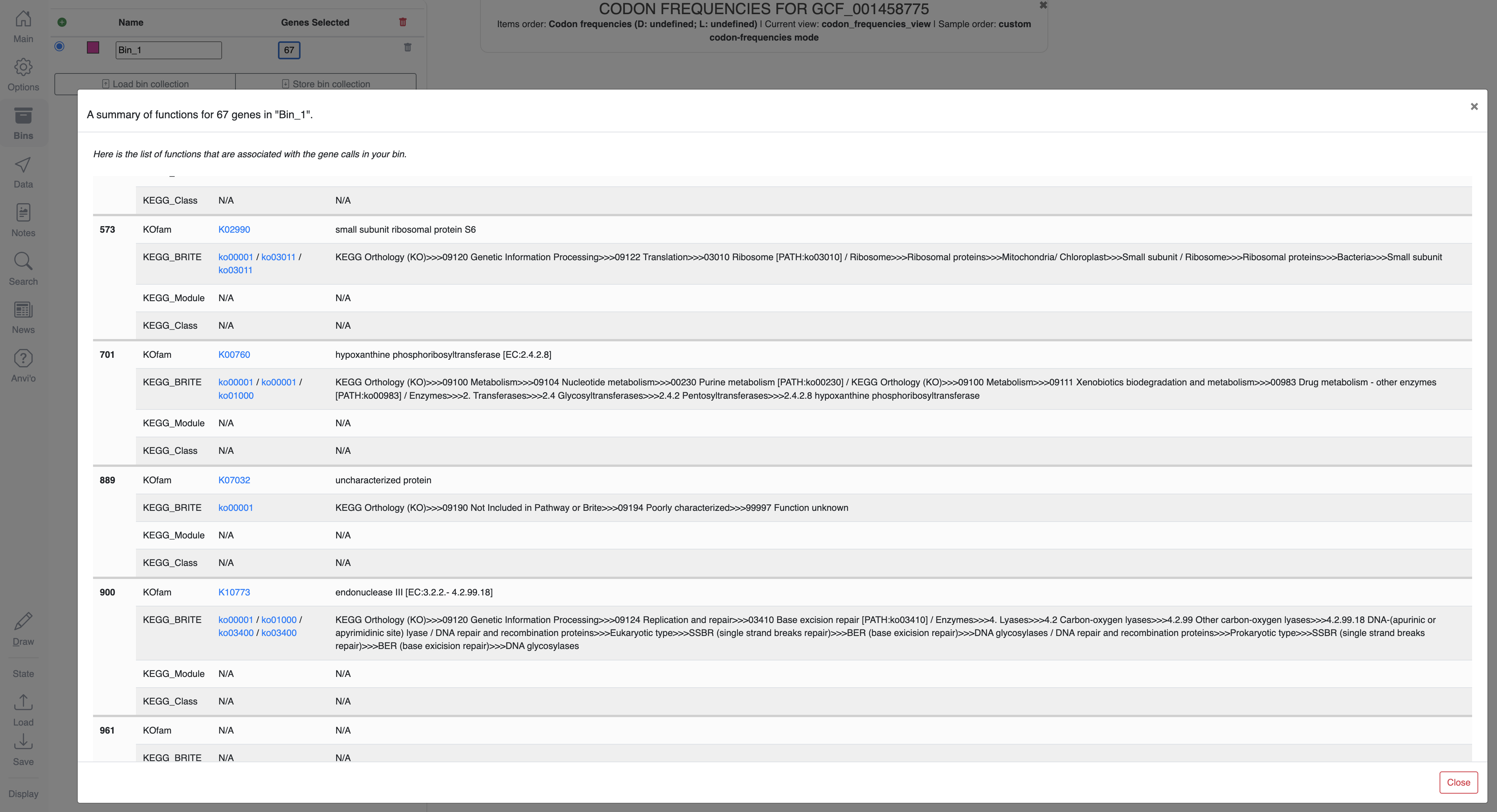
Bin selection is possible in all visualizations, and clicking on the button that shows the number of genes in a given bin in the Bins panel will open a window that displays their functions:
Working with a profile-db
By default, the program will initiate a blank profile-db, a temporary file stored under a directory that will be cleaned up by the operating system regularly. This means that storing states and bins, and re-running anvi-display-codon-frequencies will not bring the stored data back.
Alternatively, the user can define a specific location for a profile-db, upon which the program would generate a blank profile at this precise location:
anvi-display-codon-frequencies -c GCF_001458775.db \
                               -p GCF_001458775-PROFILE.db
This profile-db can be used to visualize the same data repeatedly; however, future visualizations will require anvi-interactive rather than anvi-display-codon-frequencies:
anvi-interactive -p GCF_001458775-PROFILE.db \
                 --manual
Edit this file to update this information.
Command line interface
The following is the list of parameters and their descriptions in the latest version of anvi-display-codon-frequencies.
The code that generates this web page ensures that this information is the latest available in 9-dev (eunice). Which means, in some cases the information in this section (generated automatically) might be more comprehensive or up-to-date compared to the descriptions above (written by humans).
Command line usage
Parameters and their descriptions
-c, --contigs-dbCONTIGS_DB- Anvi'o contigs database generated by 'anvi-gen-contigs-database'
-p, --profile-dbPROFILE_DB- Anvi'o profile database
--gene-caller-idsGENE_CALLER_IDS- Select genes by ID, space-separated.
--infinity-to-zero- Replace NA (empty) values in output with 0.0. NA occurs with `--synonymous` when all codons for an amino acid are absent in a gene or function, resulting in 0/0, reported as NA. Use with caution.
--relative- Return relative frequencies across codons or amino acids in each gene or function.
--synonymous- Return synonymous (per-amino acid) frequencies among the codons encoding each amino acid in each gene or function.
--return-amino-acids- Return frequencies of the sets of codons encoding the same amino acid.
--encodings-txtENCODINGS_TXT- Changes to the standard genetic code can be provided in this tab-delimited file of two columns. Each entry in the first column is a codon and each entry in the second column is the three-letter code for the decoded amino acid. For example, to recode the stop codon, TGA, as Trp, 'TGA' would be placed in the first column and 'Trp' in the same row of the second. Stop/termination codons are abbreviated 'STP'. This option affects per-amino acid and synonymous codon output (when using `--return-amino-acids` or `--synonymous`).
--sum- Sum frequencies across genes, returning a single row for each genome. When functions or function sources are selected, genes are subsetted to those annotated with the requested functions or annotated by the requested sources.
--average- Average frequencies across genes in the genome, returning a single row for each genome. When functions or function sources are selected, genes are subsetted to those annotated with the requested functions or annotated by the requested sources.
--gene-min-codonsINTEGER- Set the minimum number of codons required in a gene. When functions are returned rather than genes, this filter is applied to genes before grouping them as functions. Default:
0 --exclude-amino-acidsAMINO ACID- Remove codons that decode the given amino acids (use three-letter codes, e.g., Ala, and STP for stop codons). If `--synonymous`, this argument defaults to 'STP Met Trp', and if other amino acids are excluded, for STP, Met, and Trp codons to still be excluded from the output table, they must also be explicitly provided in the argument.
--include-amino-acidsAMINO ACID- This is the complement of `--exclude-amino-acids`. Only codons for the given amino acids are analyzed and reported.
--sequence-min-amino-acidsINTEGER- Do not report codons for amino acids (and STP) that are less numerous than the given argument. For example, if the argument is 5, and a gene or function query has 4 codons encoding Asn, 2 AAT and 2 AAC, then a row for this gene in the output table will have missing values in Asn columns. This filter occurs at the end of the analysis before writing results and so does not affect prior calculations. Default:
0 --pansequence-min-amino-acidsPANSEQUENCE_MIN_AMINO_ACIDS- The first value of the argument is a positive integer representing a minimum number of codons encoding an amino acid -- 'min_amino_acids' -- and the second is a number between 0 and 1 representing a fraction of genes -- 'min_gene_fraction'. Remove codons for amino acids (and STP) that are less numerous than 'min_amino_acids' in a 'min_gene_fraction' of genes. For example, if 'min_amino_acids' is 5 and 'min_gene_fraction' is 0.9, then if there are fewer than 5 codons for an amino acid/STP in ≥90% of genes, then the columns for these codons are dropped. Default:
[0, 1.0] --min-codon-filterMIN_CODON_FILTER- This argument arises from the ambiguity of filters that remove genes and functions by number of codons (`--gene-min-codons` and `--function-min-codons`) in relation to filters that drop codons (`--exclude/include-amino-acids` and `--pansequence-min-amino-acids`). Genes (and functions) can be filtered by their full length, e.g., genes shorter than 300 codons are ignored. They can also be filtered by the number of codons remaining after dropping codons. The codon length filter followed by dropping codons can result in genes and functions with fewer codons than the original codon threshold -- thus the option of both 'length' and 'remaining' filters to ensure that total codon frequencies in the output always meet the minimum codon threshold. 'both' is needed as an option in addition to 'remaining' so dynamic codon filtering by `--pansequence-min-amino-acids` operates on genes that passed the first length filter. Choices:
lengthremainingbothDefault:both
--dry-run- Don't do anything real. Test everything, and stop right before wherever the developer said 'well, this is enough testing', and decided to print out results.
--skip-news- Don't try to read news content from upstream.
-I, --ip-addressIP_ADDR- IP address for the HTTP server. The default ip address (localhost) should work just fine for most. Default:
localhost -P, --port-numberINT- Port number to use for anvi'o services. If nothing is declared, anvi'o will try to find a suitable port number, starting from the default port number, 8080.
--browser-pathPATH- By default, anvi'o will use your default browser to launch the interactive interface. If you would like to use something else than your system default, you can provide a full path for an alternative browser using this parameter, and hope for the best. For instance we are using this parameter to call Google's experimental browser, Canary, which performs better with demanding visualizations.
--read-only- When the interactive interface is started with this flag, all 'database write' operations will be disabled.
--server-only- The default behavior is to start the local server, and fire up a browser that connects to the server. If you have other plans, and want to start the server without calling the browser, this is the flag you need.
--password-protected- If this flag is set, command line tool will ask you to enter a password and interactive interface will be only accessible after entering same password. This option is recommended for shared machines like clusters or shared networks where computers are not isolated.
--user-server-shutdown- Allow users to shutdown an anvi'server via web interface.
Additional Resources
Are you aware of resources that may help users better understand the utility of this program? Please feel free to edit this file on GitHub. If you are not sure how to do that, find the __resources__ tag in this file to see an example.