profile-db
Table of Contents

A DB-type anvi’o artifact. This artifact is typically generated, used, and/or exported by anvi’o (and not provided by the user)..
🔙 To the main page of anvi’o programs and artifacts.
Provided by
Can be provided by
anvi-display-codon-frequencies
Required by
anvi-cluster-contigs anvi-delete-collection anvi-delete-misc-data anvi-delete-state anvi-export-collection anvi-export-gene-coverage-and-detection anvi-export-items-order anvi-export-misc-data anvi-export-splits-and-coverages anvi-export-state anvi-gen-fixation-index-matrix anvi-gen-gene-consensus-sequences anvi-gen-gene-level-stats-databases anvi-gen-variability-profile anvi-get-split-coverages anvi-import-items-order anvi-import-metabolite-profile anvi-import-misc-data anvi-import-protein-profile anvi-import-state anvi-inspect anvi-interactive anvi-merge-bins anvi-refine anvi-rename-bins anvi-show-collections-and-bins anvi-show-misc-data anvi-split anvi-summarize anvi-script-add-default-collection anvi-script-gen-distribution-of-genes-in-a-bin
Can be used by
anvi-db-info anvi-display-metabolism anvi-display-structure anvi-estimate-genome-completeness anvi-estimate-metabolism anvi-estimate-scg-taxonomy anvi-estimate-trna-taxonomy anvi-get-aa-counts anvi-get-codon-frequencies anvi-get-codon-usage-bias anvi-get-sequences-for-hmm-hits anvi-get-short-reads-from-bam anvi-import-collection anvi-migrate anvi-search-sequence-motifs anvi-update-db-description anvi-script-gen-genomes-file
Description
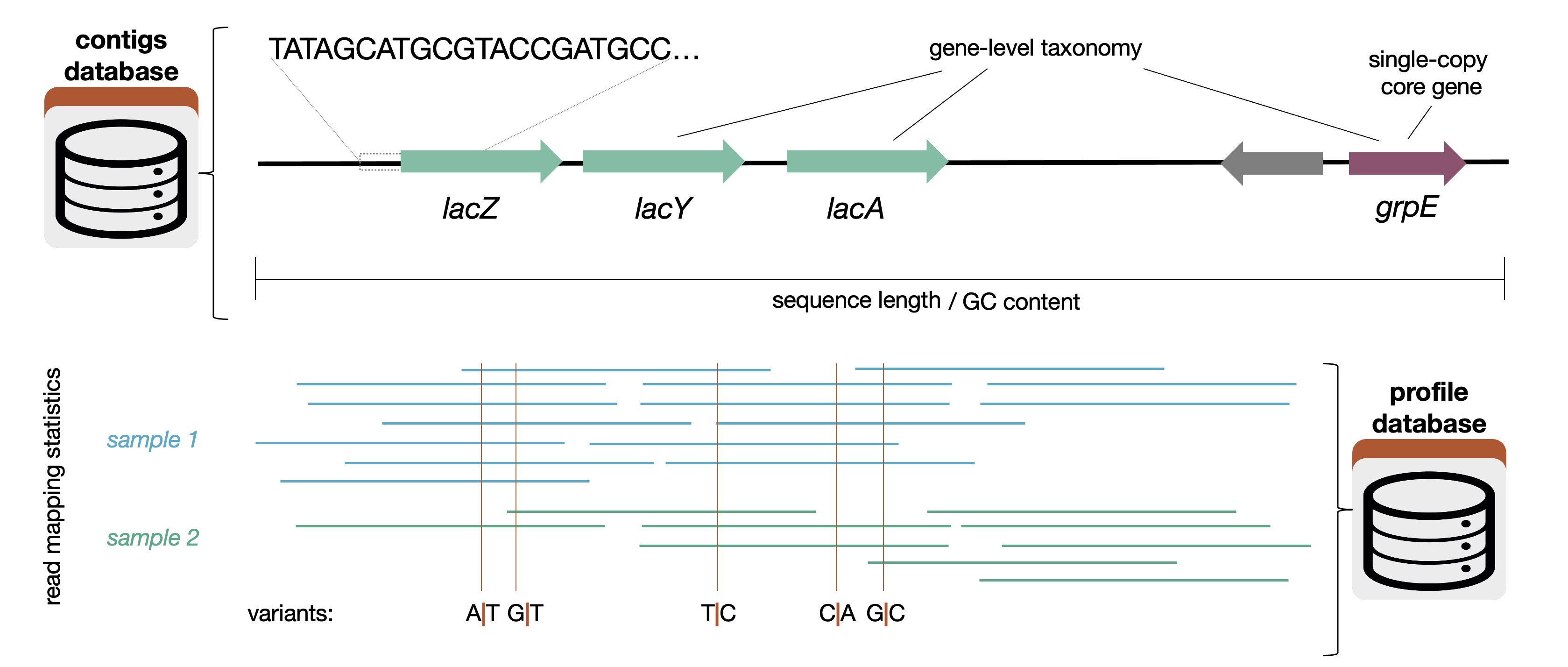
An anvi’o database that contains key information about the mapping of short reads from multiple samples to your contigs.
You can think of this as a extension of a contigs-db that contains information about how your contigs align with each of your samples. The vast majority of programs that use a profile database will also ask for the contigs database associated with it.
A profile database contains information about how short reads map to the contigs in a contigs-db. Specifically, for each sample, a profile database contains
- the coverage and abundance per nucleotide position for each contig
- variants of various kinds (single-nucleotide, single-codon, and single-amino acid)
- structural variants (ex. insertions and deletions) These terms are explained on the anvi’o vocabulary page.
This information is necessary to run anvi’o programs like anvi-cluster-contigs, anvi-estimate-metabolism, and anvi-gen-gene-level-stats-databases. You can also interact with a profile database using programs like anvi-interactive.
Technically, “profile-db” refers to a profile database that contains the data from several samples – in other words, the result of running anvi-merge on several single-profile-db. However, since a single-profile-db has a lot of the functionality of a profile-db, it might be easier to think of a profile database as a header referring to both single-profile-dbs and profile-dbs (which can also be called a merged-profile-dbs). For simplicity’s sake, since most users are dealing with multiple samples, the name was shortened to just profile-db. The following are a list of differences in functionality between a single profile database and a merged profile database:
- You can run anvi-cluster-contigs on only a merged profile database (or profile-db), since they look at the alignment data in many samples
- You cannot run anvi-merge or anvi-import-taxonomy-for-layers on a merged profile database, only on a single-profile-db.
How to make a profile database
If you have multiple samples
- Prepare your contigs-db
- Run anvi-profile with an appropriate bam-file. The output of this will give you a single-profile-db. You will need to do this for each of your samples, which have been converted into a bam-file with your short reads.
- Run anvi-merge on your contigs-db (from step 1) and your single-profile-dbs (from step 2). The output of this is a profile-db.
If you have a single sample
- Prepare your contigs-db
- Run anvi-profile with an appropriate bam-file. The output of this will give you a single-profile-db. You can see that page for more information, but essentially you can use a single-profile-db instead of a profile database to run most anvi’o functions.
Variants
Profile databases, like contigs-dbs, are allowed to have different variants, though the only currently implemented variant, the trnaseq-profile-db, is for tRNA transcripts from tRNA-seq experiments. The default variant stored for “standard” profile databases is unknown. Variants should indicate that substantially different information is stored in the database. For instance, single codon variability is applicable to protein-coding genes but not tRNA transcripts, so SCV data is not recorded for the trnaseq variant. The $(trnaseq-workflow)s generates trnaseq-profile-dbs using a very different approach to anvi-profile.
Info for Developers
This section describes some implementation details of profile databases that are relevant to anyone writing code that reads from or writes to them.
Handling zero values
To save space, profile databases do not store rows with zero values in the view tables (e.g., mean_coverage_splits, detection_contigs, and so on). This matters a lot when reads from a metagenome are mapped to a large collection of references, since most contigs and splits will have no coverage in most samples. Instead of writing the same zero to every view table, each (item, sample) pair without coverage is listed once in one of the following tables:
zero_coverage_contigs: contigs with no coverage in a given sample (columnsitemandlayer, wherelayeris the sample name)zero_coverage_splits: splits with no coverage in a given sample (same columns)
These tables are filled by anvi-profile in two places:
- Before profiling, the BAM file index is used to find contigs that have no mapped reads at all. These contigs are not profiled, and they and all of their splits are added to the zero coverage tables (see
store_zero_coverage_for_skipped_splitsinanvio/profiler.py). - After profiling, the remaining contigs and splits are checked for zero mean coverage. A contig can have zero coverage despite being counted in the BAM index if none of its reads survived filtering (for instance, when all of them are removed by a
--fetch-filteror--min-percent-identity, or when they lack a CIGAR string or query sequence). Such contigs and all of their splits are added to the zero coverage tables. A split within an otherwise-covered contig can also have zero coverage if the reads do not map to that split region, in which case only that split is added tozero_coverage_splits.
When single profiles are merged with anvi-merge, the zero value tables of all input profiles are concatenated. When a profile is split with anvi-split, the rows for the contigs and splits in each bin are copied over.
When data are read from the database, the zero-values are added back into the returned data on-the-fly. DB.get_view_data() (in anvio/db.py) reads the non-zero rows from the view table, then uses DB.get_zero_value_tables_for_view_table() to find which zero value tables apply to it (the _contigs or _splits version, based on the suffix of the view table name), and fills in a value of 0 for every (item, sample) pair listed there. As a result, code that uses get_view_data() sees the complete matrix including zero values. Code that reads view tables directly (e.g., with get_all_rows_from_table()) will only see the non-zero rows, and therefore may need to additionally work with the zero value tables.
Profile databases older than version 42 stored the explicit zero rows in the view tables. The migration to version 42 moved them into the zero coverage tables, and the migration to version 43 moved the remaining zero rows of contigs whose reads were all filtered out.
Number of reads tables
Since version 43, profile databases store the number of reads that map to each contig and to each split in each sample, in the following tables:
num_reads_contigs: the number of reads per contignum_reads_splits: the number of reads assigned to each split (see below)zero_read_splits: splits that have nonzero coverage but no reads assigned to them
The first two tables have the same structure as view tables (entry_id, item, layer, value), but they are not registered as views, so they are not shown in the interactive interface or used for clustering. They also follow the same convention for zero values: contigs and splits without coverage are not stored in these tables, since they are already listed in the zero coverage tables described above (and every contig with nonzero coverage has at least one read). A split with nonzero coverage, however, can still have zero reads assigned to it (see below), so such splits are listed in the zero_read_splits table, which is the counterpart to the num_reads_splits table.
To get the complete data including zeros, use get_view_data() with these table names, just like for view tables. For num_reads_contigs, use expand_to_splits=False, since copying the read count of a contig to each of its splits would not make sense.
The self table key num_reads_stored tells you whether these tables contain data. It is False (0) for blank profiles, and for databases migrated from older versions, in which case the tables exist but are empty, since the number of reads cannot be recovered without the BAM file. Code that uses these tables should check this key first, and ask the user to re-run anvi-profile if the read counts are missing. anvi-merge refuses to merge profiles with different values for this key (unless --force is used).
Which reads are counted
The number of reads in these tables is not necessarily the number of reads that map to a contig according to the BAM file. Only the reads that are actually used to compute coverage are counted, which means that the following are excluded:
- reads that are removed by a
--fetch-filter - reads with a percent identity below
--min-percent-identity - reads without a CIGAR string or query sequence
Note also that each alignment in the BAM file is counted, so (for paired-end data) the two reads in a pair are counted separately, and secondary or supplementary alignments are also counted unless a fetch filter removes them. In other words, the read count of a contig is the number of alignments that contribute to its coverage values. This keeps the read counts consistent with the coverage data stored in the same database, which is important for analyses that use both (such as the expected spread used in discov-stats).
How reads are assigned to splits
A read can span the boundary between two (or more) splits of a contig. To avoid counting such reads more than once, each read is assigned to exactly one split, so that the read counts of all splits of a contig add up to the read count of the contig. A read is assigned to the split that contains most of its aligned bases, that is, the bases in the aligned blocks of the read (the same ones that contribute to coverage, so soft-clipped bases, insertions, and deletions are not considered). If two splits contain the same number of aligned bases, the read is assigned to the earlier one. Reads that do not cross a split boundary (the vast majority) are simply assigned to the split in which they start. See Coverage.get_split_index_for_read() in anvio/bamops.py for the implementation.
As a result of this assignment, a split can have nonzero coverage but zero reads assigned to it, if every read that covers it has most of its aligned bases in neighboring splits. This can happen, for example, with long reads that span multiple splits. These are the splits that are listed in the zero_read_splits table.
Edit this file to update this information.